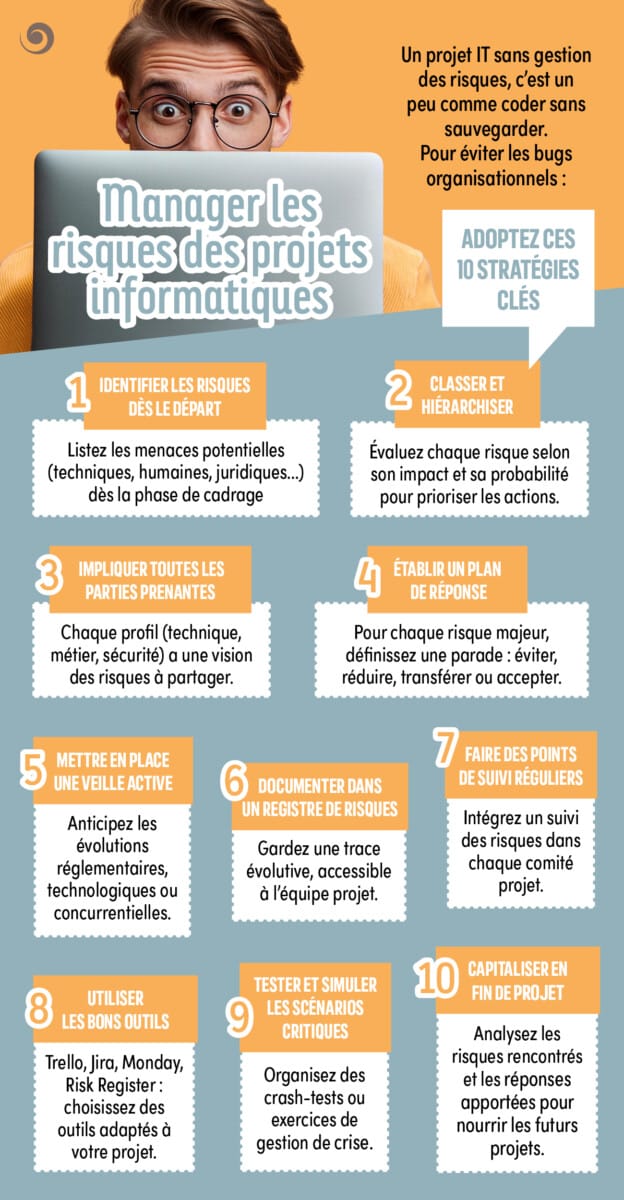
An IT project without risk management is a bit like coding without backup. To avoid organisational bugs, adopt these 10 key strategies.

1. Identify risks from the outset
Risk management must start at the scoping stage, even before the project goes live. The aim is to identify anything that could compromise deadlines, budget, quality, safety or user acceptance.
The risks can be of several kinds: poorly controlled technological choice, dependence on a service provider, lack of availability of teams, unclear business requirements, technical debt, security flaws, regulatory non-compliance, underestimation of the workload or resistance to change.
To be effective, organise a risk workshop with key stakeholders. Ask everyone to identify the feared events, their possible causes and their consequences. The earlier this identification is made, the greater the room for manoeuvre.
To remember: A risk that is not identified at the outset often costs much more when it becomes a problem during the course of the project.
2. Classify and prioritise
Not all risks deserve the same level of attention. Some are unlikely or have little impact, while others could jeopardise the whole project. It is therefore essential to classify them.
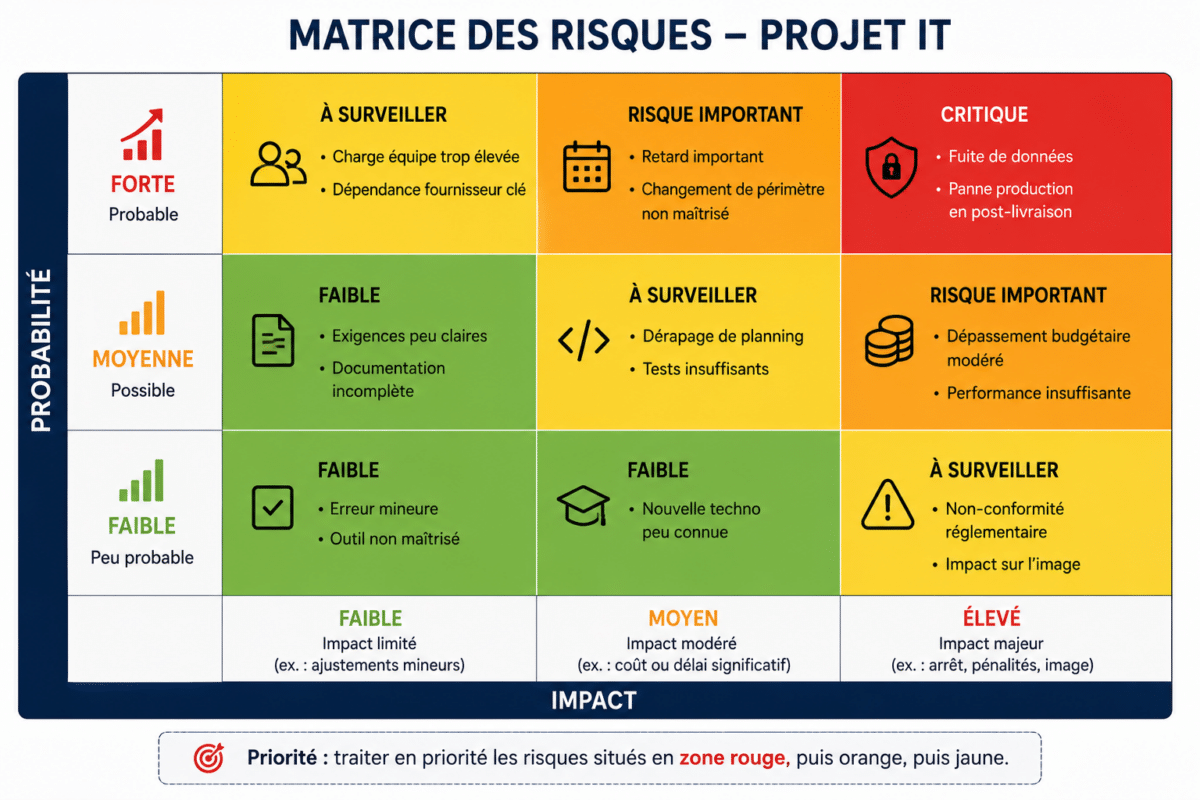
The simplest method is to assess each risk according to two criteria: its probability of occurrence and its potential impact. The impact may concern the schedule, the budget, the quality of the deliverable, safety, the company's image or compliance.
You can use a criticality matrix with three levels : low, medium, high. Risks with a high probability and high impact must be dealt with as a priority. This prioritisation avoids dispersing efforts and allows the team to focus its energy on the really sensitive issues.
To remember: prioritising risks means accepting that not everything can be treated with the same intensity...
3. Involving all stakeholders
Risk management must not remain in the hands of the project manager alone. Each player has a different view of the project and can detect threats invisible to others.
Technical teams often identify risks relating to architecture, performance, integration or technical debt. Business teams identify risks relating to usage, adoption or functional inadequacy. Security teams anticipate vulnerabilities, sensitive access or data leakage risks. Legal experts and compliance managers alert you to regulatory obligations.
Involving these profiles from the outset helps to build a more complete vision. It also reinforces collective ownership: everyone understands that risk management is a shared responsibility.
To remember: the more varied the points of view, the less the project will progress with blind spots.
4. Draw up a response plan
Identifying a risk is not enough: you have to decide what you will do if it occurs, or better still, what you will put in place to prevent it. For each major risk, define a clear response.
Four main strategies are possible. You can choose avoid the risk, For example, by abandoning a technology that is too unstable. You can reduce, by adding tests, training or a pilot phase. You can also transfer it, For example, through a contract with a service provider or an insurance policy. Finally, you can accept it, when its impact is controllable or the cost of prevention would be too high.
Each response must be associated with a person in charge, a deadline and concrete actions. Without this, the response plan remains theoretical.
To remember: a good response plan transforms a vague risk into manageable actions.
5. Set up an active monitoring system
Risks evolve throughout an IT project. A regulatory decision, a security breach, the obsolescence of a technology, the departure of an expert or a change in strategy on the part of a software publisher can suddenly alter the level of risk.
By keeping an active watch, you can anticipate these changes. This monitoring can cover security vulnerabilities, software updates, legal developments, open source dependencies, market practices or supplier decisions.
It should not be reserved for large projects. Even a medium-sized project can be heavily impacted by an external change. The important thing is to define who monitors what, how often and how alerts are escalated.
To remember: a low risk today can become critical tomorrow.
6. Document in a risk register
Oral memory is not enough to manage risks. A risk register makes it possible to centralise essential information and track changes over time.
This register must contain at least These include: the name of the risk, its description, its cause, its possible impact, its probability, its level of criticality, the person responsible for monitoring, the actions planned, the progress made and the date of the last update.
The format can be simple: shared spreadsheet, collaborative page, project tool or dedicated module. The most important thing is that the document is accessible, understandable and regularly updated. A register that is too complex may no longer be used.
To remember: what is not documented is difficult to monitor, share and improve.
7. Carry out regular check-ups
A risk register is only as good as its lifeblood. It should be reviewed regularly during project committees or progress reviews.
At each review, check whether new risks have appeared, whether certain risks have changed level, whether the planned actions are progressing and whether the closed risks can really be removed from the monitoring. This discipline prevents unpleasant surprises.
Monitoring must remain pragmatic. It is not a question of making each meeting too long, but of integrating a few minutes dedicated to risks into the day-to-day management. For critical projects, a specific meeting may be necessary.
To remember: a risk that has been identified but never reassessed can become a silent incident.
8. Use the right tools
Tools facilitate visibility, collaboration and monitoring, but they are no substitute for method. The choice depends on the size of the project, the level of complexity and the habits of the team.
For a small project, a well-structured spreadsheet may suffice. For an agile project, Jira, Trello, Azure DevOps or Monday can integrate mitigation tasks, alerts and responsibilities. For more regulated environments, a dedicated risk management tool may be preferable.
The important thing is to choose a tool that is actually used by the team. A tool that is too sophisticated, poorly populated or isolated from the rest of the management system will quickly become useless.
To remember: the best tool is the one that makes risks visible and actionable on a daily basis.
9. Testing and simulating critical scenarios
Some risks deserve to be tested before they actually occur. This is particularly true for scenarios relating to security, performance, service continuity or incident recovery.
Depending on the project, you can organise load tests, intrusion tests, backup restoration exercises, failure simulations, failover rehearsals or crisis management exercises. These tests can be used to check that the plans really work.
They often reveal unexpected flaws: incomplete procedures, ill-defined roles, forgotten dependencies, unrealistic deadlines or lack of coordination. It's better to discover these weaknesses during an exercise than during a real crisis.
To remember: an untested plan remains a hypothesis.
10. Capitalise at the end of the project
Risk management doesn't stop at delivery. At the end of the project, take the time to analyse what really happened Which risks had been well anticipated, which had been underestimated, which had not been identified, and which responses had been effective.
This capitalisation can take the form of feedback, a project assessment or a knowledge base. The aim is to improve future projects, enhance risk register models and avoid repeating the same mistakes.
It's also an opportunity to showcase the best practices put in place by the team. An organisation that learns from its projects gradually becomes more mature in its risk management.
To remember: Each completed project must strengthen the organisation's ability to manage subsequent projects more effectively.