No sooner has one meeting finished than another begins. Between back-to-back video conferences, packed diaries and discussions that are sometimes unproductive, many employees feel they are wasting a great deal of time. Administrative assistants have a key role to play in restoring meaning to meetings: fostering productive discussions, streamlining team coordination and facilitating effective decision-making. Artificial intelligence now offers them new tools to further enhance this impact. Elisabeth Duverney-Prêt, a specialist in assistant and secretarial roles, explains.

Meetings are now taking up an increasing amount of time in companies. According to several studies carried out in recent years, notably by the Observatory on Information Overload and Digital Collaboration, employees spend on average more than 10 hours a week in meetings! For managers, this figure often exceeds 20 hours, whilst some senior executives may spend more than 30 hours in meetings. Over the course of a year, this can amount to several months’ worth of work.
Yet, despite all the time spent in meetings, many of them are still perceived as ineffective. And for good reason: objectives that are too vague, discussions that drag on, and a lack of concrete decisions. Teams widely share the feeling that they are wasting their time. This is precisely where the role of assistants and secretaries becomes crucial.
By acting as genuine coordinators, capable of organising discussions and improving the flow of information, they can restore the meetings to their full effectiveness.
Get trained!
Conducting an effective meeting
Optimise your meetings to save time and improve the quality of decisions. Develop your facilitation skills to boost participants’ engagement and cooperation.
With the rise of hybrid working, working practices have, of course, changed profoundly. Microsoft Teams, Zoom and Google Meet have made organising meetings much easier. Invitations are generated automatically from digital calendars, and participants can join from different locations. However, this convenience has its downsides: meetings follow on from one another more quickly than before, gradually filling up diaries, and running them presents new challenges. For example: keeping participants’ attention, ensuring everyone has a fair chance to speak, and sharing the right documents.
Under this new hybrid working model, the preparation and organisation of meetings are therefore essential.
Training: Leading successful remote meetings
A task that goes far beyond mere logistical organisation
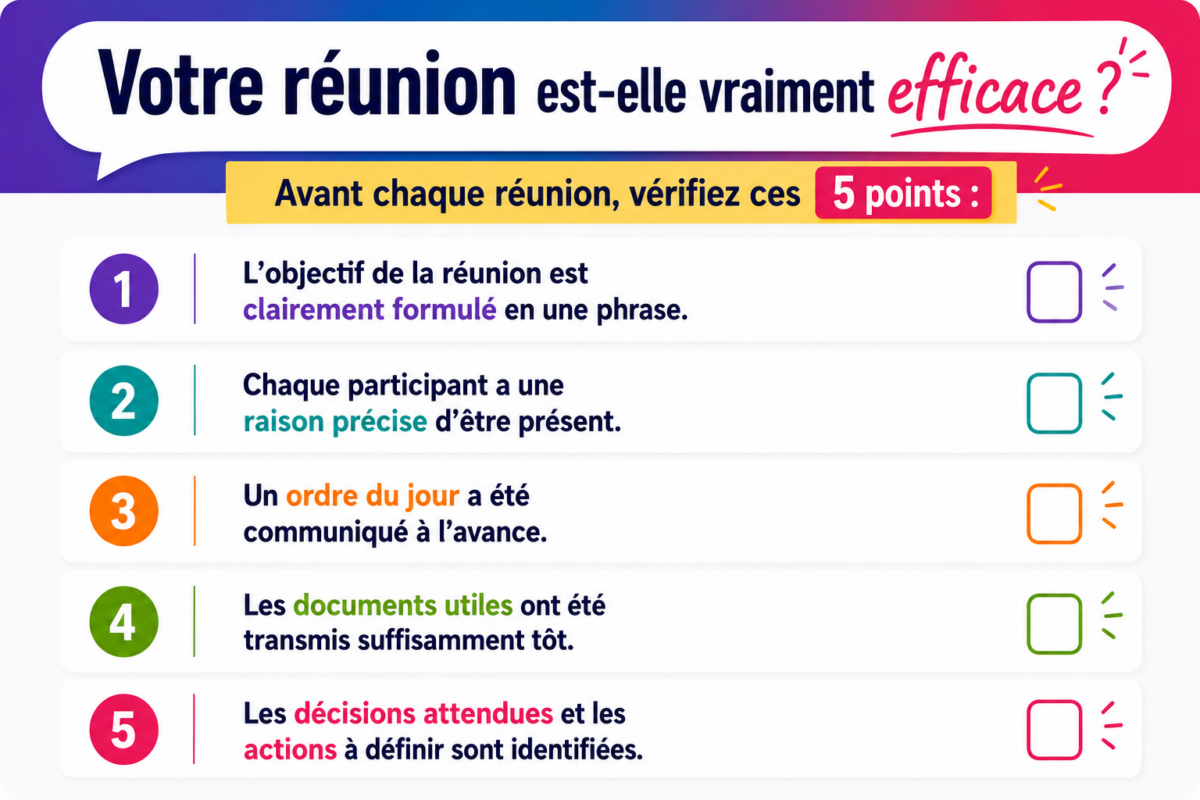
Poorly defined objectives, participants not properly identified, a vague agenda or documents sent too late… The problems encountered during meetings become apparent well before they even begin.
The aim, therefore, is for the assistants to create the conditions for a useful and productive exchange.
«In my team, the systematic use of a structured agenda – setting out the objectives and the decisions to be taken – has clearly changed the dynamics of our meetings. My assistant plays a vital role, as she coordinates invitations, checks that participants are available, reviews and organises the agendas, and gathers the necessary documents in advance. This prevents downtime during the meeting and makes action tracking much more reliable!», confirms a manager at a Paris-based company.
In practice, this drive to improve efficiency is, in fact, prompting assistants to support their managers in three key areas:
- Clarify the purpose of the meeting
- Plan the meeting in advance
- To formalise decisions and the actions to be taken
1. Clarify the purpose of the meeting
A meeting will only be effective if it serves a clear objective. All too often, several objectives become intertwined, quickly leading to confusion in discussions. Defining the expected outcome precisely in advance helps to give the meeting a clear direction and ensures that participants are all working towards the same goal. This might involve, for example, make a decisionof confirm a course of study or provide a progress update on a project.
Before planning the meeting, the assistants can therefore ask a few key questions:
- What is the expected outcome?
- Is this meeting really necessary?
- What sort of meeting is planned (decision-making, briefing, group work)?
«Very often, simply rephrasing the objective with the manager is enough to completely transform the meeting. We move from a vague discussion to something much more concrete and effective.», says Claire, an executive assistant at an industrial group in Seine-et-Marne.
2. Plan the meeting in advance
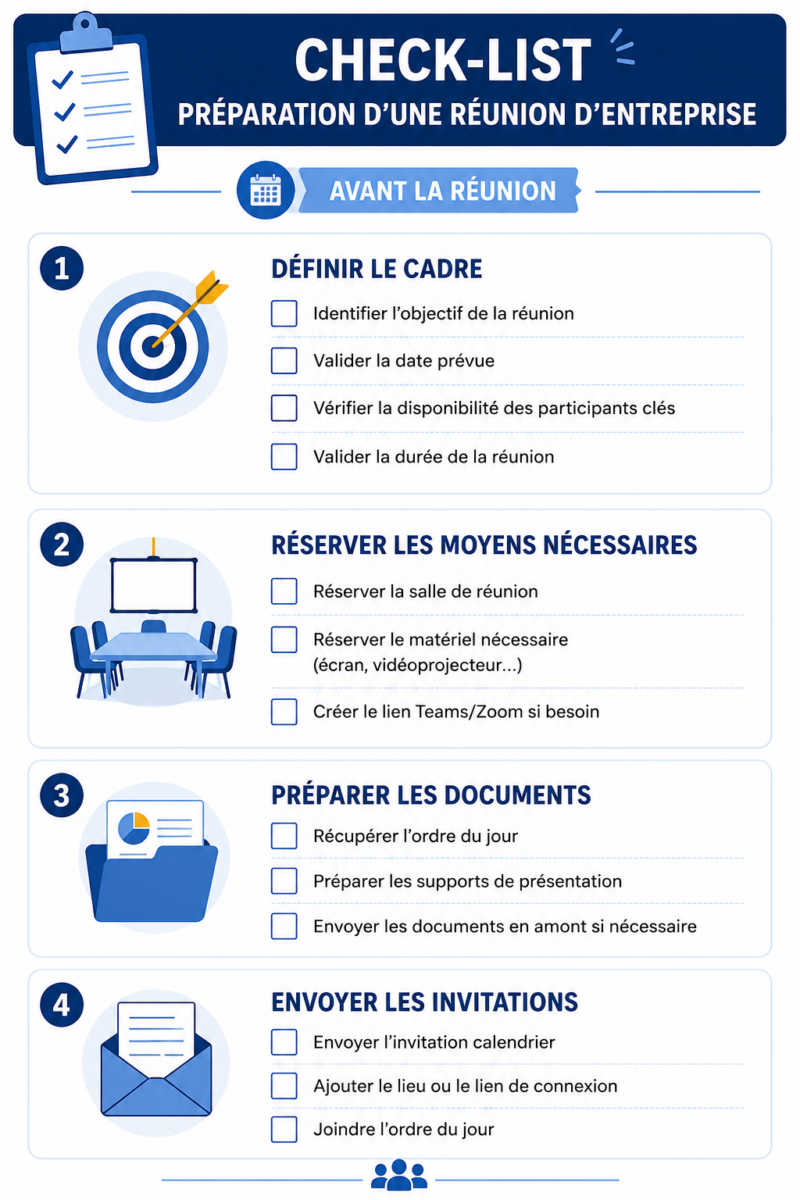
Once the objective has been clarified, it’s time to consider the the agenda and structure of the meeting. There are a number of best practices that can be implemented in this area:
- set a clear and agreed agenda in advance
- allocate an approximate time to each topic
- select participants who are genuinely affected
- to submit the preparatory documents in good time.
These elements enable participants to arrive better prepared and to stay focused on the essentials. The assistants thus contribute directly to the quality of the discussions.
3. Formalise decisions and actions
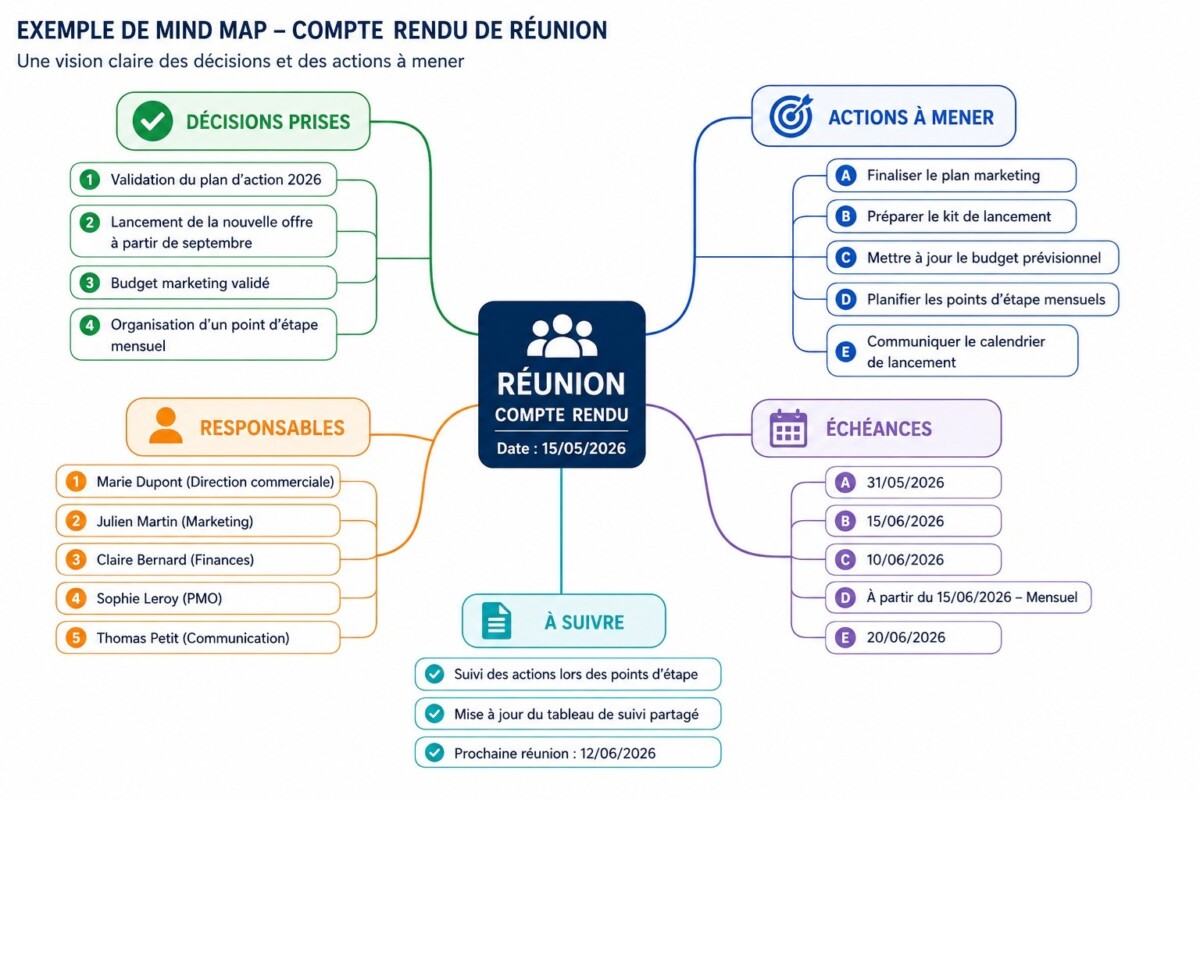
A meeting will only be worthwhile if it leads to concrete actions, set out in clear written form. This task is an integral part of the assistants’ role, which ensure a link between what has been said, what has been decided and what is to be implemented. The quality of the report is therefore essential and should focus on the following key points:
- decisions taken
- actions to be taken
- identified officials
- specified deadlines
Read also : Optimising note-taking for greater efficiency
This approach enables everyone to quickly identify their priorities and facilitates collective monitoring. The mind map (mind mapping) is a particularly effective tool in this context. It enables you to to organise discussions visually by organising ideas around the decisions taken and the actions to be taken. Used for note-taking or summarising, it provides a clear, concise and immediately actionable overview.
Training: Mind mapping: making meetings more engaging with mind maps
Finally, the collaborative tools (shared spreadsheets, to-do lists, automatic reminders) complement this approach by streamlining operational monitoring and in ensuring effective coordination between the parties involved.
Case study: how can you halve the length of a meeting?
Before
Weekly meeting scheduled to last 1½ hours
Agenda sent the day before, not very detailed
12 participants, several of whom were not particularly interested
Documents submitted at the last minute
Scattered discussions and few formal decisions
The assistant’s contribution
Clarifying the objective with the project manager: making three specific decisions
Drawing up an agenda with a time allocated to each item
Selection of only those participants directly involved (8 people instead of 12)
Submission of preparatory documents 48 hours in advance
Preparation of a report template with decisions and actions to be filled in in real time
After
Meeting shortened to 45 minutes
Three decisions taken and approved
Report published within the next hour
Clearly identified responsible parties and deadlines
Fewer catch-up meetings and better progress on the project
Result : a shorter, more dynamic and, above all, more useful meeting for all those taking part.
Meeting management transformed by artificial intelligence (AI)
L'IA is gradually establishing itself as a a real asset when it comes to organising and following up on meetings.
Preparation
Integrated into the tools used by assistants on a daily basis, it enables them to to simplify the preparation stage. Using existing documents (emails, previous minutes, presentations, etc.), it can in fact produce a clear summary key points, but also suggest an agenda, highlighting priority topics, decision points or information to be shared. The time saving is important, as it allows assistants to focus on other key tasks.
During the meeting
AI can also be used for:
- to generate an automatic transcript of the conversations
- identify key moments (important questions, decisions, disagreements)
- to highlight the topics that require further exploration
This support enables participants to remain fully focused on the discussions, without having to write down every detail.
After the meeting
AI also provides practical support by generating an initial report, identifying actions to be taken and suggesting that certain tasks be assigned to relevant contacts according to their roles. This initial draft must, of course, be reviewed and adjusted — as AI cannot replace an understanding of human factors or the ability to prioritise — but it does mean you don’t have to start from scratch.
Which AI tools should you use?
There are now many tools that incorporate these meeting-specific features. Among the best known are Microsoft Copilot, integrated with Teams and Outlook, Google Gemini For Workspace, or specialised solutions such as Otter.ai or Fireflies.ai, which can automatically transcribe conversations, generate summaries, identify next steps… Other solutions such as Noota or Praiz also appeal to businesses that are mindful of privacy and GDPR compliance issues.
Read also : What if AI became your key to productivity?
Little by little, artificial intelligence is thus transforming the role of assistants by relieving them of tasks that can easily be automated (taking notes, formatting, summarising) and enabling them to refocus on tasks that offer greater added value.
«I used to spend a lot of time writing up meeting minutes. I had to go through my notes, organise the information and check that I hadn’t left anything out. Since we’ve been using a tool with automatic transcription and summarisation, I easily save an hour per meeting. I also feel much more productive during the meeting: I can pay closer attention to the participants, revisit important topics and plan the next steps. AI doesn’t do everything, but it allows me to focus on what really matters.», points out Sophie, an executive assistant in Savoie.
As digital tools and artificial intelligence transform business practices, the skills expected of administrative assistants are also evolving. Their role is no longer limited to organising meetings or handling the administrative follow-up: they are becoming true facilitators of teamwork, capable of structuring discussions, streamlining the flow of information and contributing to more effective decision-making. In a context where meetings are playing an increasingly significant role in day-to-day working life, their effectiveness has become a key factor not only in performance but also in quality of life at work. This presents a great opportunity for assistants!