For some time now, Photoshop has been more than just image-editing software; it has become a creative tool. It is now an AI-assisted visual production environment. This has transformed the way it is used professionally. An update on Photoshop’s new features and uses, with Esther Perreau, an expert specialising in desktop publishing and office software.
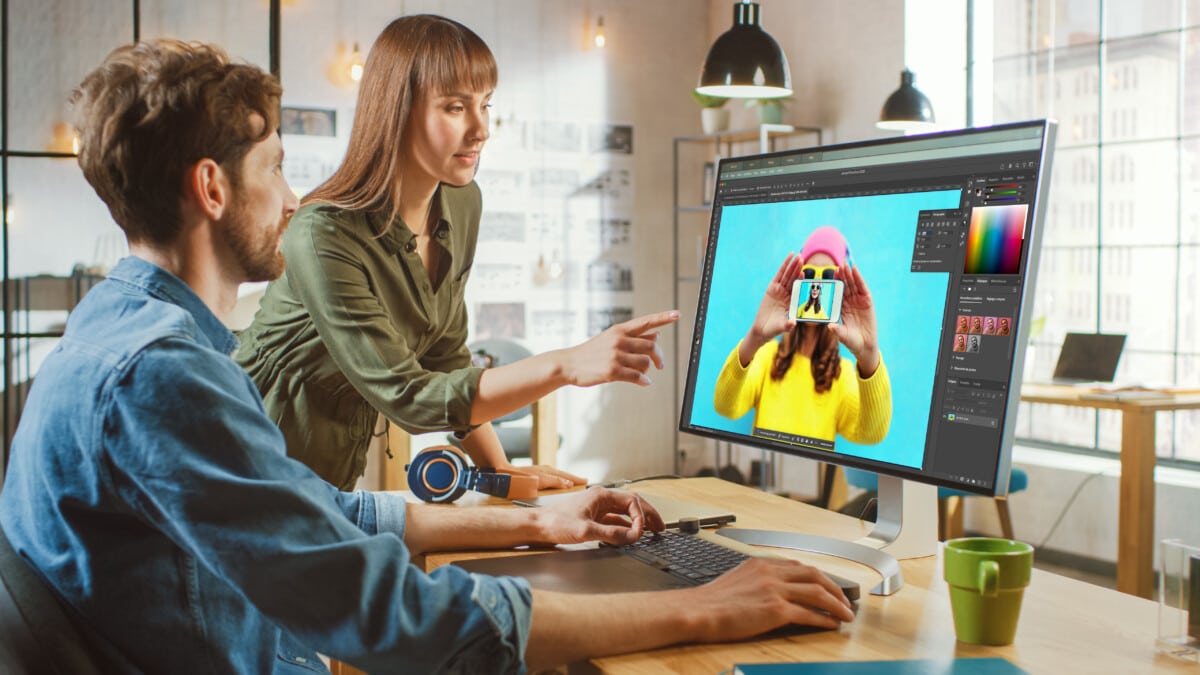
Long regarded as the go-to tool for photographers, graphic designers and art directors, Adobe’s iconic software is taking another step forward. The integration of AI features directly into the workflow opens up entirely new possibilities: image generation, smart fill and image upscaling.
But behind this technological revolution, a key question arises: what role will creators now play?
Photoshop: from a technical tool to an augmented creation platform
A long-standing pillar of the visual arts sector
For over thirty years, Photoshop has established itself as the industry standard in the field of image-based professions. Whether in photography, advertising, publishing or digital communications, it has shaped the way visuals are created and edited.
Its historical strength lies in precision, not speed. Layers, masks, non-destructive editing, dynamic objects… every element can be controlled with precision. It is this technical rigour that has built its reputation.
Read also : Photoshop on the web: the essentials, shared
A gradual evolution… followed by an acceleration driven by AI
Over the years, Photoshop has evolved without losing sight of its core identity. Performance has been improved, workflows optimised and the interface modernised.
Today marks a significant milestone. AI does not replace the software’s core functionality; rather, it enhances it. It acts as an intelligent assistant, integrated directly into the interface, to simplify certain steps without compromising the software’s business logic.
A tool that remains demanding, but is more powerful and better suited to today’s needs
Photoshop remains a technical programme. However, it has become smoother and more responsive. It meets today’s demands: rapid content production.
Photoshop is becoming a comprehensive visual production tool, going far beyond simple image editing.
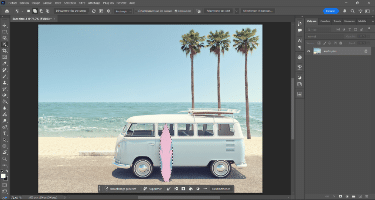
New AI features in Photoshop
More powerful and intelligent tools, integrated directly into the interface
Generative filling and generative development are transforming the practice.
In practical terms: adding, removing or extending an element can now be done in a matter of seconds, whilst maintaining the visual consistency of the image.
Automatic selections are more accurate, cut-outs are cleaner, and corrections look more natural. These aren’t just gimmicks: they’re tools that reduce repetitive technical tasks and ensure a high-quality final result. These tools represent a major change for roles such as communications officers, who can now work more quickly and focus more on the message and visual consistency.
Image generation and the use of AI to explore new creative avenues
Image generation ushers in a new phase of work: exploration. Based on a simple description, Photoshop offers several visual variations that serve as a creative starting point: moods, compositions and graphic styles. The AI generates three versions, but also allows you to generate similar results based on one or all three versions and to enhance their quality. In the beta version of Photoshop, it also lets you choose which AI to use (Adobe Firefly, Nano Banana, etc.).
So what does this mean for graphic designers? It allows them to quickly explore several creative avenues based on a single idea, test out different styles and moods, and refine their proposals without having to go through lengthy production phases.
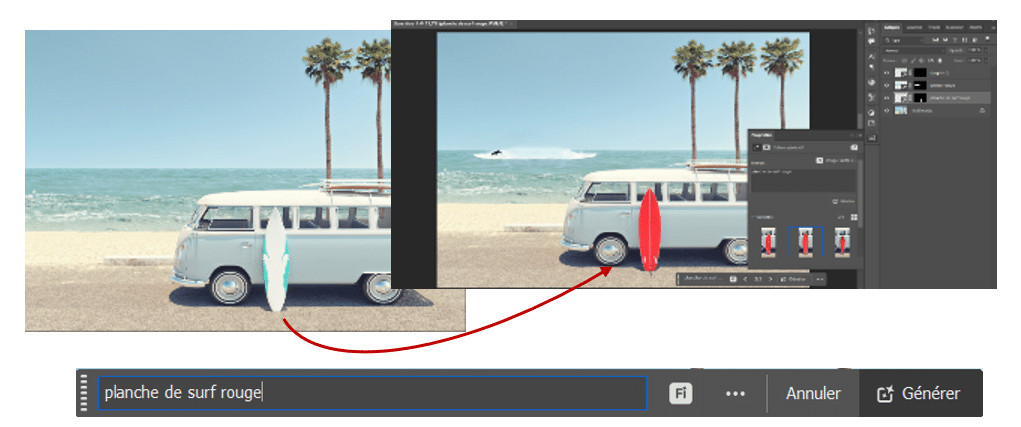
AI is becoming a tool for visual thinking. It allows us to experiment without immediately having to embark on a long and complex project.
Smoother integration into existing projects
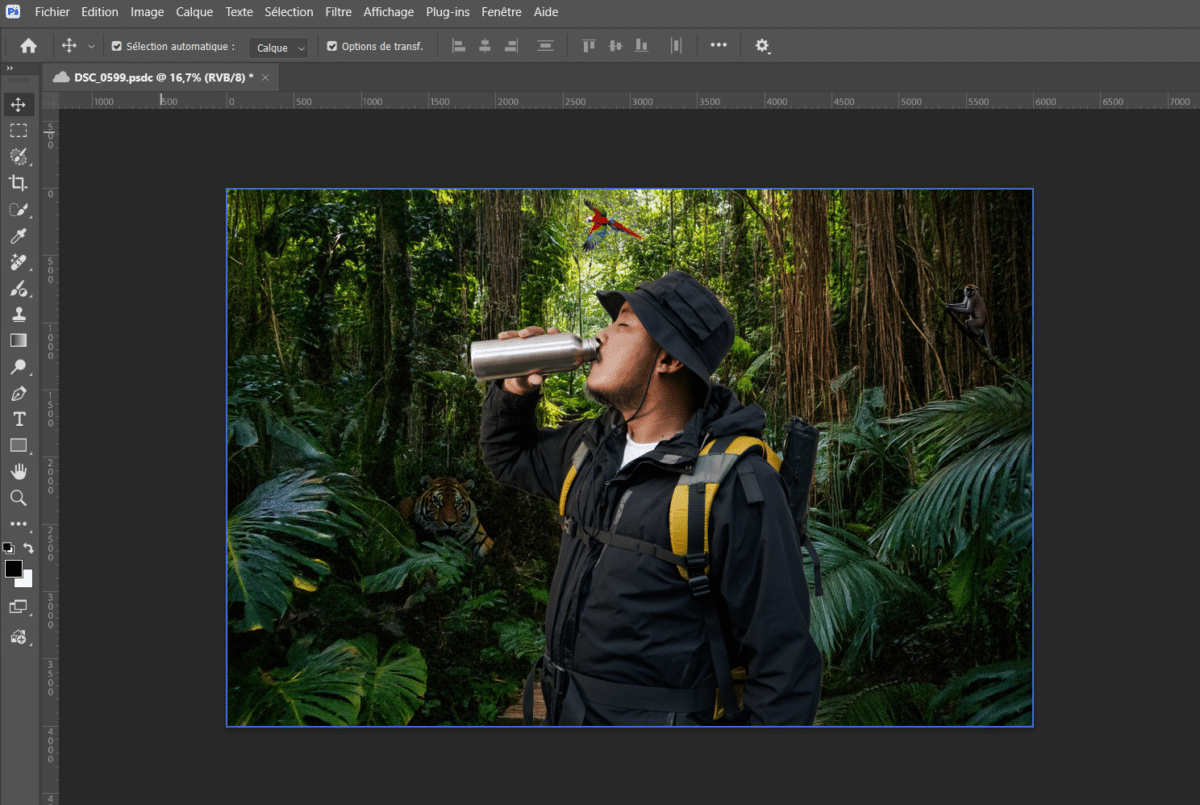
One of the latest features, the «Harmonise» button (beta version) in the context menu, allows you to automatically harmonise generated content with the style of the existing design: colours, lighting, textures and overall consistency. This makes it easier to incorporate new ideas – those that were sometimes clear in our minds but difficult to implement technically. Concepts thus become more accessible and easier to integrate into an already structured project.
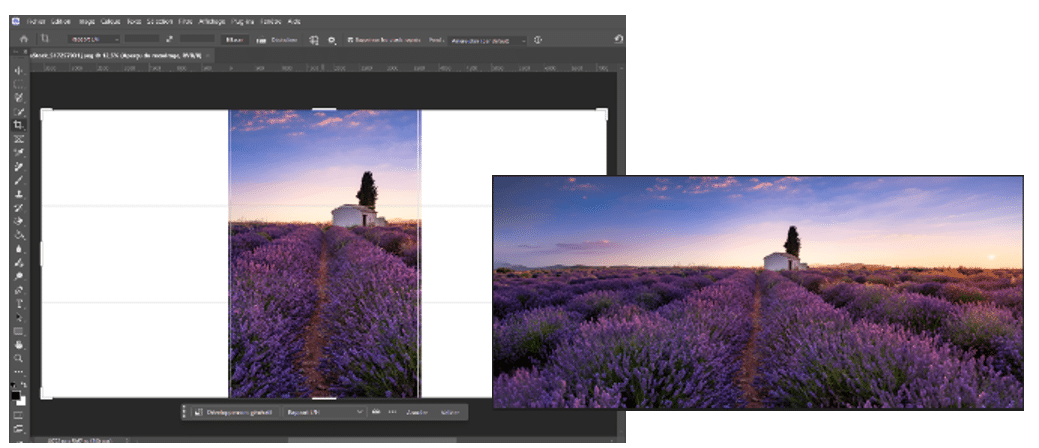
Among the latest AI features is background removal, which makes it easier to isolate the subject. Generative AI, meanwhile, is establishing itself as an essential tool for extending or modifying an image in a coherent and realistic way.
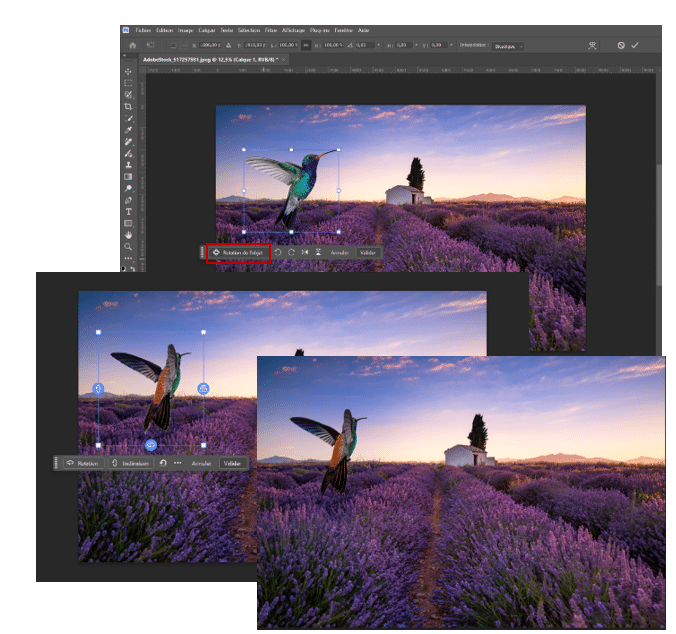
And the latest gem in the beta version, «Object Rotation» – which is also included in the context menu – now allows you to rotate a 2D object into an orientation close to 3D.
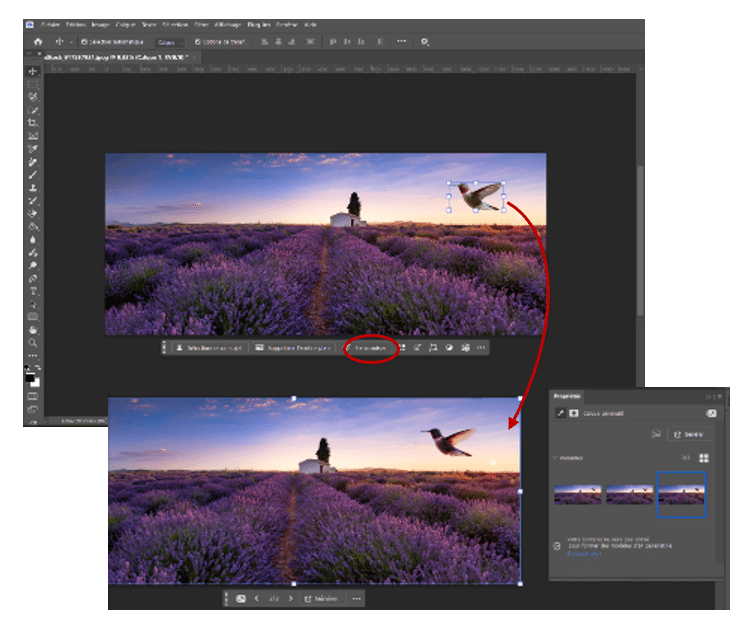
Here is a list of AI features from the last six years
Image generation and transformation
| Function | How it feels | How did we manage before? | Gain |
| Generate an image | Creates a complete image from a prompt. | Looking for stock image libraries or a photo shoot. | Endless creativity and time saved on research. |
| Generative filling | Adds or edits an object in a selected area using text. | Manual photo editing, complex cut-outs and shadow adjustments. | Seamless and instantaneous blending with the existing image. |
| Development / Generative expansion | Stretches the edges of an image to change its aspect ratio (e.g. from portrait to landscape). | «Content-Aware Scale» tool (which often distorts the image) or manual cloning. | Logical consistency of the setting, without any distortion. |
| Generate a background | Replaces the entire background behind a subject with a new scene. | Careful cutting out of the subject and manual insertion of a new background. | Creates an immediate atmosphere whilst maintaining depth of field. |
| Reference image | Use a third-party image to guide the style or structure of the generation. | Trial and error with prompts or manual tweaks to replicate a style. | Precise quality control of visual elements and adherence to a style guide. |
Integration and harmonisation of elements
| Harmonise (beta version) | Matches the colours and lighting of an imported object to those of the background. | Manual adjustments to Curves, Levels and Hue/Saturation. | Natural visual integration with just one click. |
| Rotating the object (beta version) | Allows you to rotate an element or subject to change its orientation (angle, horizontal/vertical). | 3D tools (now removed), a more complex approach generally reserved for advanced users. | Simple, quick and accessible. |
Smart selection and cropping
| Selecting the subject / object | Isolates the main element or a specific object when you hover over it. Specifically isolates faces, skin, clothing or hair. | Pen, Lasso or Magic Wand tools (imprecise). | Ultra-fast cutting, even on irregular shapes. |
| Recruitment | Crop a subject and isolate it. | Complex blending masks and a manual brush for fine-tuning. | Surgical precision on the most challenging areas (e.g. sideburns, eyebrows, hair). |
Cleaning and removing items
| Delete Tool | Removes an object by «reimagining» what lies behind it (background fill AI). Detects distractions: cables or people in the background. | Clone Stamp tool or Spot Healing tool (with a risk of repetition). | Complete disappearance with no visible repetition of texture. |
Portrait retouching and enhancement
| Smart Portrait | Changes the facial expression (smile), age or the direction the head is facing. | Manual Fluidity tool (very limited for real expressions). | Stunning realism to convey emotion in a portrait. |
| Depth of field (beta) | Creates an artificial background blur based on the distance of the objects. | Manually creating a gradient «depth map». | Looks professional even in photos taken on a smartphone. |
Restoration and enhancement of visual heritage
| Colourise | Add realistic colours to a black-and-white photo. | Creation of dozens of colour layers in «Soft Light» mode. | Restore old photos in a matter of seconds. |
Before: talent lay in mastering the technical tools (knowing how to use the Pen or Curves tools). We spent 80 % of the time on the execution.
Today: talent lies in artistic direction and intent. AI handles the technical execution in a fraction of the time, allowing you to focus on the message and composition.
Professional practices undergoing radical change
AI built into Photoshop speeds up production
Artificial intelligence is directly changing the work pace. Tasks that used to require several steps – precise cropping, removing elements, extending the frame – can now be completed in a matter of seconds.
A visual can be adapted for use in several formats (social media, print, web) more quickly. The generative development adapts an image without complex reconstruction. The generative filling simplifies advanced editing.
The benefit is technical, but above all strategic: less time spent on execution, more time devoted to consistency and the message. Ultimately, productivity increases without compromising on quality.
It broadens the scope for creativity
AI doesn’t just save time. It actually changes the way we conceive a project. It allows us to explore more freely, to try out unusual visual approaches and to be more daring.
Some ideas used to seem too ambitious or too time-consuming to implement. Now, they can be tested straight away. AI therefore acts as a creative exploration engine and a catalyst for new ideas.
It enables you to improve efficiency without compromising on quality
AI also helps to ensure the quality of projects. Adjustments are more consistent, technical errors are less frequent, and the results are more uniform.
Photoshop retains its professional requirement : colour management, high definition, print compatibility. AI does not replace this expertise; it complements it. The value lies in the choices made, the artistic direction and the overall consistency of the visual.
Photoshop and AI: what are the challenges for professionals?
Working together differently: the cloud is changing the way we work
With cloud-based features, projects can be shared, commented on and edited remotely. Communication is smoother and approvals are faster.
This development is transforming collaboration. Work is no longer confined to a single role. It is becoming more collaborative, structured and traceable.
Making a bigger impact: producing high-quality visuals quickly
In an environment saturated with images, producing consistent and professional visuals quickly is becoming a strategic priority. Companies need to communicate more frequently, across a wider range of media.
AI makes it possible to reduce turnaround times whilst maintaining a strong visual identity. Speed becomes a competitive advantage, provided that quality is not compromised.
The creator’s «touch», which remains essential
When AI generates part of an image, a question arises: who is the author? Under French and European law, copyright protection is based on originality and the author’s personal touch. A purely automated creation is not sufficient.
The value of the creator lies in their intention, the choice of prompts, the selection of suggestions and the adjustments made. The AI makes suggestions. The human decides, structures the work and assumes artistic responsibility. It is therefore this conscious intervention that underpins the value and recognition of the work.
The new challenges posed by AI
AI speeds up production, but it also introduces new operational constraints.
Firstly, certain generative functions are part of an approach based on generative credits. For professional use, these factors matter: the cost, the subscription tier and access to premium features become an integral part of the actual workflow.
Next, the transparency becomes a matter of production, not just communication. Adobe uses Content Credentials, metadata added to an image to indicate its origin, its author, its revision history and, in some cases, the use of AI. This is not merely a cosmetic detail: it is a practical response to the challenges of content traceability, although it does not, on its own, guarantee the legal authenticity of a piece of content.
Finally, with regard to artificially generated or manipulated content, particularly where it involves deepfakes, the transparency requirements The requirements set out in the European AI Regulation (AI Act) must be understood, even though exceptions apply to certain standard editing functions that do not substantially alter the meaning of the content.
How can you make the most of AI in Photoshop?
To get the most out of these tools, here are a few best practices.
- Retain creative control; don’t settle for the first result generated
- Using AI as a tool for exploring various avenues: testing, comparing and refining
- Integrate the results into a holistic approach (artistic direction, visual identity, consistency)
- Set a clear objective before creating or editing an image
- Always check the result: proportions, hands, faces, shadows, reflections, perspective, text
- Don’t automate everything: some images still require precise retouching and complete control
- Maintaining brand consistency: colours, style, layout, visual tone
- Train teams in critical thinking, not just in technical skills
- Ensure that the traceability and accountability of the content produced are maintained
- View AI as a means of enhancing skills, not as a shortcut to the easy way out
The limitations of AI in Photoshop
- Poor at drawing hands, faces, small details and complex objects
- Still has difficulty handling text embedded in images
- Unreliable when it comes to accurately reproducing a product, a brand or a visual identity
- Lack of consistency from one image to the next
- Improves photomontages, but does not guarantee perfect composites
To remember
- AI is significantly speeding up visual production
- It opens up new creative possibilities
- It is no substitute for human expertise
- The designer’s role is becoming more strategic
Training to master Photoshop and AI
To take your skills to the next level and master these new features, ORSYS offers Photoshop training courses suitable for all levels. Discover the training programme Getting started with Adobe Photoshop and Adobe Photoshop, advanced.
«Getting started» level» :
Get to grips with the main features of Photoshop so you can create and edit digital images. You’ll learn how to prepare your graphic elements and export them for use on the web.
Practical exercise: create a film poster using layers, masks and editing tools (AI and basic features).
«Advanced» level» :
Take your Photoshop skills to the next level. Discover its new built-in AI features, learn how to refine your layers and vector paths, create complex images and automate tasks.
Practical exercises: creating a mock-up and designing a visual by combining image generation and retouching (integration, adjustments and enhancing the final result using Photoshop tools and AI).
Participants speak out :
«A training course that’s very well tailored to our needs, which takes the time to go over any sticking points if necessary. A comprehensive and very interesting course.»
«A very easy course to follow; the pace is just right and the content is varied, making it easy to get to grips with the software.»
With AI, Photoshop goes beyond simple image editing to become a true creative tool. Uses are evolving, capabilities are being refined, and beta versions offer a glimpse of what’s to come. But one thing remains unchanged: the creator’s intention and vision.