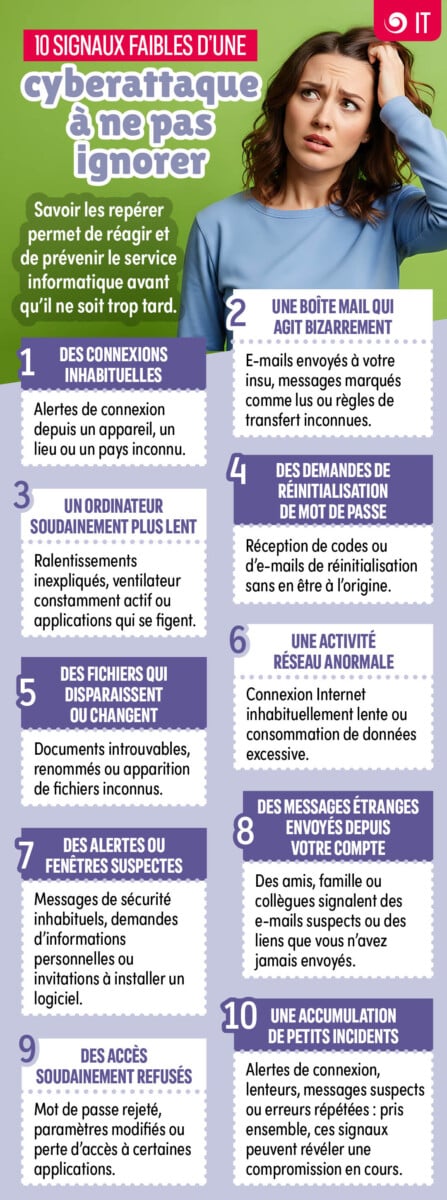
A cyberattack does not always manifest itself in a dramatic way. It may begin with minor anomalies: an unusual connection, a strange message, a sudden slowdown… Taken in isolation, these signs may seem harmless. But some of them should raise alarm bells and be reported promptly.

1. Unusual connections
You have received an alert stating that a login attempt has been made on your account from a device, a town or a country that you do not recognise ? Don’t overlook it!
It may simply be a location error, but it could also be an attempt at unauthorised access or a sign that a password has been compromised.
The right thing to do: Never confirm a login that you did not initiate yourself. Notify the IT department and follow the prescribed procedure to secure your account.
2. An email account that’s behaving strangely
There are certain signs that should immediately catch your attention: emails sent without your knowledge, messages already marked as read, unusual folders, unknown contacts or new automatic forwarding rules.
A hacker who has gained access to an email account may seek to remain undetected, monitor correspondence or intercept certain messages.
The right thing to do: Do not delete any suspicious items in a hurry. Report the issue to the IT department so that they can carry out the necessary checks.
3. A computer that has suddenly become slower
Your computer is running very slowly for no apparent reason, the fan is running constantly, programmes are closing or freezing, or the battery is draining much faster than usual.
These problems can have many technical causes, but one malicious activity running in the background can also draw on the organisation’s resources.
The right thing to do: Avoid restarting your computer repeatedly or installing cleaning software yourself. Instead, report any sudden and unusual changes in behaviour.
4. Password reset requests
You suddenly receive a verification code, an authentication notification or a password reset email even though you haven’t made any request.
This may mean that someone is trying to take control of your account.
The right thing to do: Do not click on any links contained in the message and never disclose the code you have received. If an authentication request appears on your phone, reject it if you did not initiate it and notify the relevant department.
5. Files that disappear or change
A document cannot be found, a file has suddenly been renamed, its file extension has changed, or new, unknown files have appeared in your folders.
These changes may be due to a handling error or a synchronisation issue, but they may also indicate unauthorised access, malware or the start of file encryption.
The right thing to do: Stop editing the files in question and report the incident immediately, particularly if several documents are affected at the same time.
6. Abnormal network activity
Your internet connection suddenly becomes very slow, data transfers seem to be taking place without you doing anything, or your device is using much more data than usual.
Malware can communicate with remote servers, download files or transmit information in the background.
The right thing to do: If the problem persists or is accompanied by other worrying signs, contact the IT department rather than trying to sort it out yourself.
7. Suspicious alerts or pop-ups
Pop-up windows suddenly appear asking you a password, bank details, an urgent confirmation or the installation of a programme. You may also see false alerts claiming that your computer is infected.
The aim is often to pressure you into acting quickly, without checking where the request is coming from.
The right thing to do: Do not click on anything, do not provide any information and do not install any software from an unexpected pop-up window. Close it if possible and report the incident.
8. Strange messages sent from your account
A colleague, a friend or a client asks you why you sent them a suspicious link, an unusual attachment or a message you do not recognise.
Your email account or one of your accounts may have been compromised and may be being used to trick other people by impersonating you.
The right thing to do: Notify the IT department immediately. Also advise the recipients not to open the suspicious message, in accordance with your organisation’s guidelines.
9. Access suddenly denied
Your usual password is no longer accepted, some apps are no longer accessible, or settings appear to have changed without you doing anything.
An attacker who gains control of an account can, for example, change the password or security settings in order to prevent the legitimate owner from accessing it.
The right thing to do: Please avoid repeated attempts and do not create a new account to get round the problem. Contact support or IT straight away.
10. A series of minor incidents
Taken on their own, a slow computer, a connection error or an unusual email might seem harmless. But Several incidents occurring in quick succession should raise suspicions.
A login alert followed by a request to reset a password, slow performance and suspicious messages may, for example, indicate that a system has been compromised.
The right thing to do: Trust your instincts. You do not need to be certain that it is a cyberattack to report it. It is up to the relevant teams to investigate the matter.
If in doubt: report it; do not try to investigate it yourself
If you notice any unusual behaviour, Prompt reporting is essential. Please do not delete messages, change settings or install any tools in an attempt to resolve the issue yourself: certain information may be useful to the technical teams in understanding what has happened.